

Recovery drills
A recovery drill restores one completed backup of one instance into a disposable guest, boots it, checks it from the node, records how long each stage took, and destroys the guest. The customer’s instance is never touched.
Drills use the same restore path as a customer restore to a new instance, so a drill exercises the restore a customer would run, on a schedule or on demand.
What a drill does
Section titled “What a drill does”- Picks a backup. The newest completed backup of the instance on a Proxmox Backup Server destination (the admin API can name a specific backup).
- Restores it into a new guest on a KVM node that shares that backup destination.
- Boots and checks the guest through the guest agent, retrying every 20 seconds until the boot timeout.
- Records the result with the restore time, the boot time and the age of the backup (how much data a real restore would have lost).
- Cleans up. Every outcome ends with the drill guest destroyed.
The drill guest is isolated by construction. It has no network interface and no IP address of any kind, so nothing inside it can reach out or send mail. It has no billing, is owned by an administrator rather than the customer, does not appear in customer lists and does not run the customer’s user data again.
What is checked
Section titled “What is checked”| Check | Passes when |
|---|---|
| Guest running | The domain is running. |
| Guest agent answers | The agent replies (this also reads the guest OS). |
| Root filesystem mounted | The guest reports its root filesystem mounted. |
| TCP port (optional) | The port you named is listening inside the guest. |
| HTTP (optional) | The guest answers on the HTTP port and path you named with a status from 100 to 499. |
A guest has no network, so the TCP and HTTP checks run from inside the guest, against its own loopback.
Drills cover ordinary instances whose backups sit on a Proxmox Backup Server destination and restore onto KVM nodes. Local, S3 and rclone backups, Proxmox nodes, managed databases and Kubernetes control planes are not drilled.
The node must run a Slave that can check a drill guest. Update the nodes first (see Hypervisors). When no node on the backup’s destination can check a guest, a manual drill is refused with node_upgrade_required, and a scheduled drill is recorded as Skipped without an alert.
Where to find it
Section titled “Where to find it”In the admin panel open Compute > Recovery proof in the sidebar, next to the backup pages (the page breadcrumb reads Backups > Recovery proof). You need the instances.backup permission, the same one as the instance backups pages.
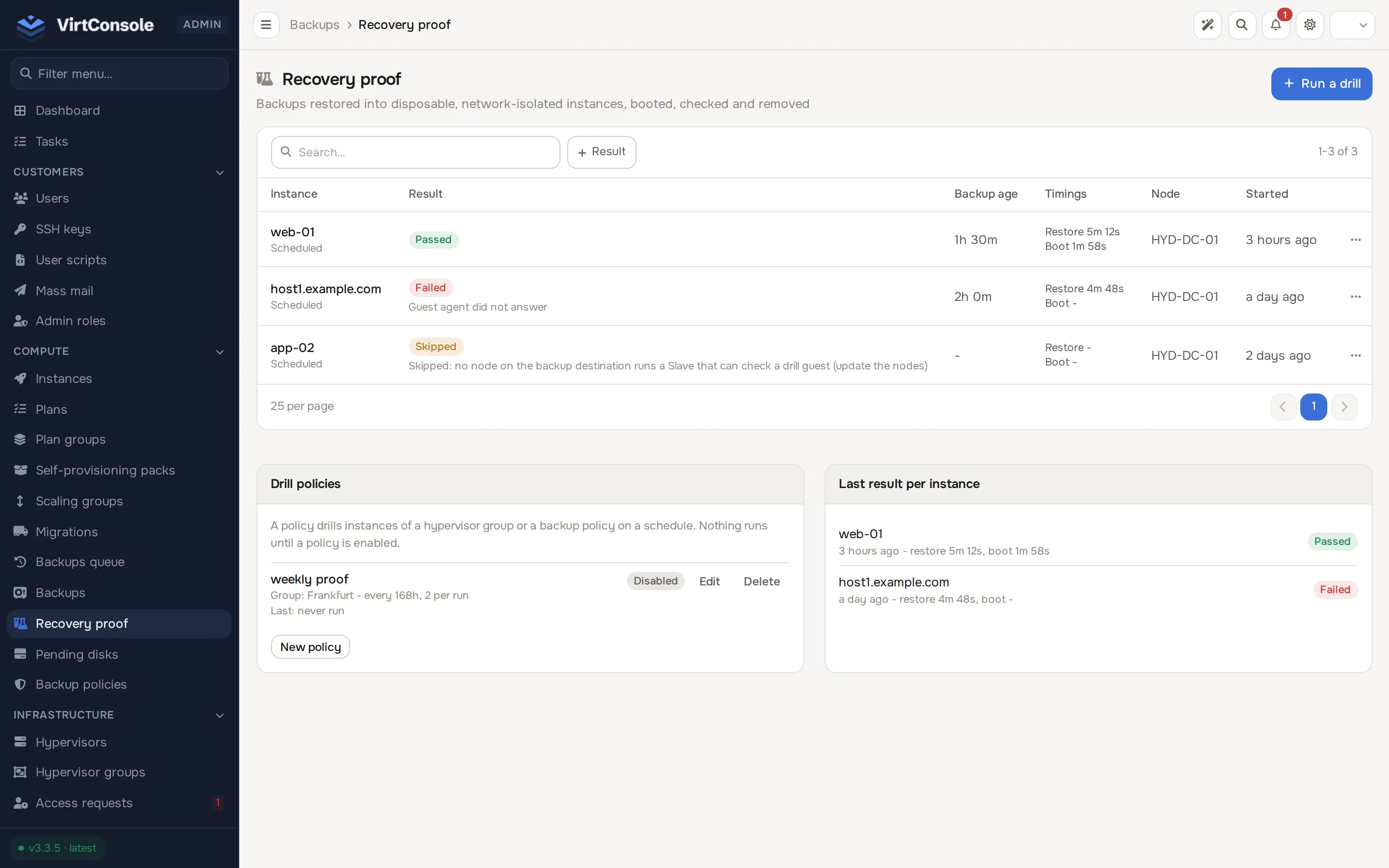
The page lists drills with their result, backup age, timings, node and start time. Below the list are Drill policies and Last result per instance, which shows the newest finished drill of each instance with its restore and boot times; a later run that was skipped is noted under it and does not replace the result.
Run a drill by hand
Section titled “Run a drill by hand”- Click Run a drill.
- Search for the Instance. Only instances that have backups appear.
- Optional: a Plan to size the drill guest (default: the instance’s plan), a TCP port, an HTTP port and HTTP path, and a Boot timeout, minutes. A restore time objective can be set on a policy, or on a manual drill through the admin API (
max_restore_minutes). - Click Run drill.
The row moves through Queued, Restoring, Checking and Cleaning up, and ends as Passed, Failed, Timed out, Cancelled or Skipped. Click a row for the individual checks and the reason.
Boot timeout
Section titled “Boot timeout”The boot timeout is the objective for how soon the guest must pass its checks after the restore finishes. It must be between 5 and 240 minutes, and defaults to 15. A drill guest has no network and its guest agent needs about 2 minutes to answer, so values below 5 are refused. A stored value below 5 runs as 5.
Restore time objective
Section titled “Restore time objective”An optional objective for the restore itself, in minutes (at least 5). Without one, a restore has no time limit. With one, a restore that runs longer ends as Timed out; the restore is not cancelled, and the drill finishes once it is done and the guest is removed.
Scheduled drills: policies
Section titled “Scheduled drills: policies”A policy drills instances on a schedule. Nothing runs until a policy is enabled.
Under Drill policies click New policy.
| Field | Meaning |
|---|---|
| Name | A label. |
| Scope and Target | A Hypervisor group or a Backup policy. A backup policy scope follows each instance’s effective backup policy. |
| Every (hours) | How often the policy runs. Default 168 (weekly). |
| Instances per run | How many instances each run drills, least recently drilled first. Default 1, up to 50. |
| Newest backup at most (hours old) | The freshest backup must be younger than this. Default 48. |
| Boot timeout, minutes | As above. |
| TCP port, HTTP port, HTTP path | Optional checks applied to every drill of the policy. |
| Restore time objective | Optional. |
| Plan | Optional plan for the drill guest. |
| Drill guest owner | The administrator who owns the drill guests. Default: you. |
| Enabled | Off by default. |
An instance in scope with no completed backup newer than the age limit is recorded as a failed drill with the reason No recent completed PBS backup, and an alert is sent; no node is involved.
Deleting a policy keeps its drill history.
Limits
Section titled “Limits”- At most 4 drills hold a node at once across the platform, and at most 1 per node. The restore also counts against the node’s own concurrent backup limit.
- A drill that finds no room retries every 10 minutes. After 24 hours it fails with No node had room for the drill.
- Only one drill can be open for an instance at a time.
Results
Section titled “Results”| Result | Meaning |
|---|---|
| Passed | The restore completed and every check passed inside the boot timeout. |
| Failed | The restore failed, was refused, or a check failed. The reason is shown, for example Guest agent did not answer, Root filesystem not mounted or Service port not listening. |
| Timed out | The restore exceeded its time objective, or the checks passed only after the boot timeout. |
| Cancelled | An administrator cancelled the drill. |
| Skipped | No node on the backup destination can check a drill guest yet (node_upgrade_required). This reflects node versions, not the health of the backup, and sends no alert. |
Every administrator account receives an email when a drill fails or times out, and when a drill guest could not be removed after ten attempts. Cancelled and skipped drills send nothing.
Cancel a drill
Section titled “Cancel a drill”Click Cancel drill on a queued, restoring or checking drill.
- A drill that has not started completes at once.
- A restore that is already running is not stopped. The drill moves to cleaning and finishes when that restore has completed and the drill guest has been removed. The detail view shows Waiting for the restore to finish until then.
If a step of the drill is running at that moment the cancel answers “drill busy”; try again in a minute.
Admin API
Section titled “Admin API”GET and POST /api/v1/recovery-drills, GET /api/v1/recovery-drills/{id}, POST /api/v1/recovery-drills/{id}/cancel, and GET, POST, PATCH, DELETE on /api/v1/recovery-drill-policies. Typed refusals carry a reason, for example drill_already_running (409), no_eligible_backup (422) and node_upgrade_required (409).
Common problems
Section titled “Common problems”- Every drill is skipped. No node on the backup destination reports the check capability. Update the nodes.
- A drill fails with “Guest agent did not answer”. The image has no running QEMU guest agent, or it needs longer than the boot timeout. Raise the boot timeout; a guest without an agent cannot pass.
- A drill guest is still listed after a failure. Cleanup retries until the guest is removed. A drill guest left behind by a drill that is gone or finished is picked up by the minute check once it is 10 minutes old and destroyed. You are alerted if it cannot be removed.