

Tools gateway
The tools gateway lets an agent inside a sandbox call external tool servers (MCP servers) such as Linear or Notion without ever holding the provider’s credentials. Customers connect their servers and pick them at launch; see Tools (MCP). This page covers what you run as the operator.
How it works, briefly
Section titled “How it works, briefly”Sign-in tokens and static tokens are held by the panel and sent to the node that runs the sandbox. The sandbox receives local connection settings and server metadata without the credential. The node’s gateway adds the credential when it forwards a call. A token is sent to a node for a sandbox that uses it. A confirmed stop or destruction of the sandbox clears that run’s gateway state, and the customer’s saved sign-in remains for later launches. When a customer disconnects a server, the panel removes the saved sign-in and requests clearing on the node. The sandbox page shows Clearing is pending while that request is unconfirmed, together with the remaining validity window.
Where to find it
Section titled “Where to find it”In the admin panel go to Sandboxes > Tools providers.
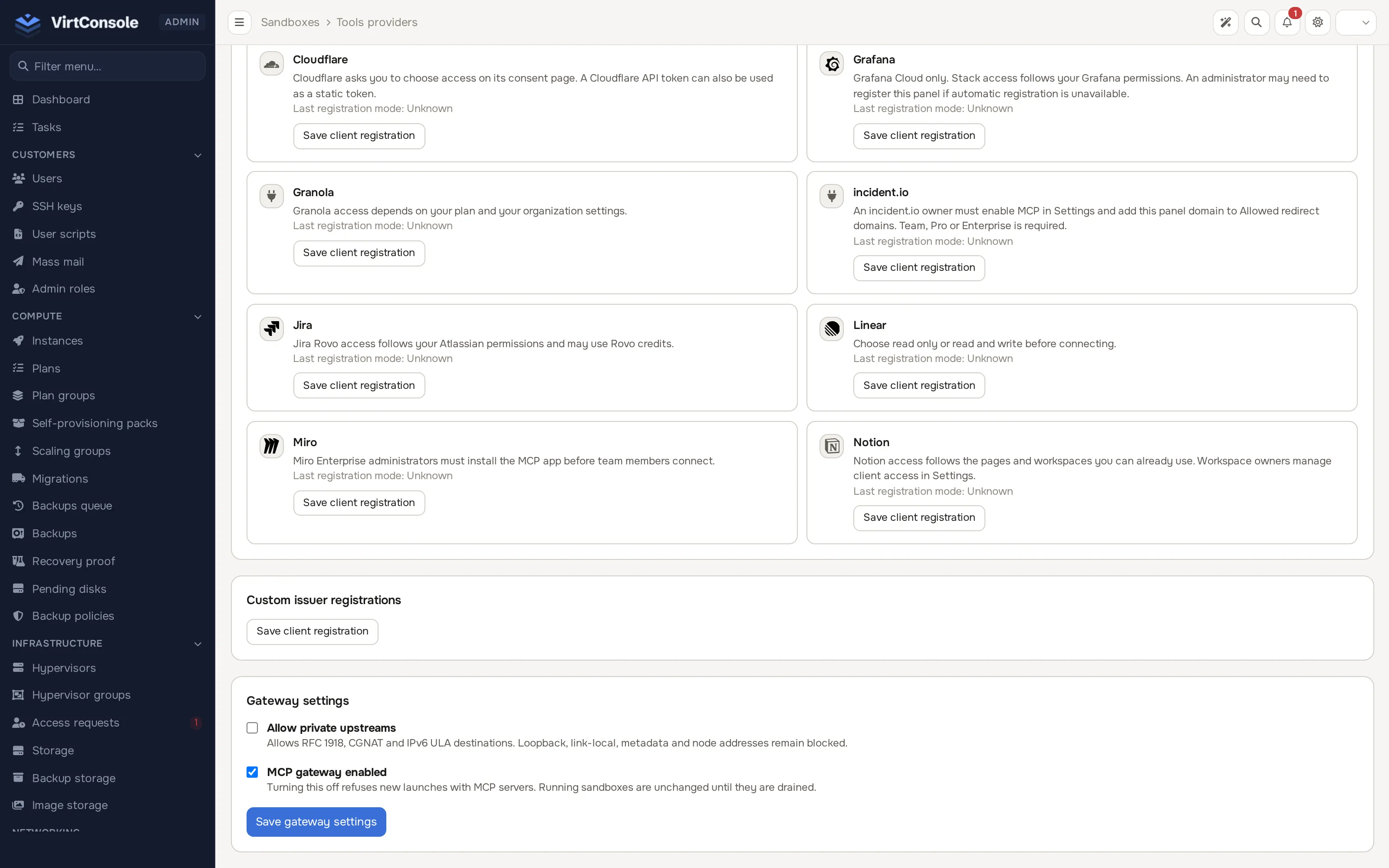
Gateway settings
Section titled “Gateway settings”The Gateway settings card has two switches:
- MCP gateway enabled: turning it off refuses new launches that select tools, and hides the Tools control in the launcher. Sandboxes that are already running keep their tools until they stop, their credential expires, or you drain the node.
- Allow private upstreams: lets customers add custom servers on private address ranges (RFC 1918, CGNAT and IPv6 ULA). Loopback, link-local, cloud metadata and node addresses stay blocked either way. Leave it off unless your customers need servers inside a private network.
Click Save gateway settings.
Provider registrations
Section titled “Provider registrations”OAuth sign-in needs the panel to be a registered client of each provider. Providers that support automatic registration can register the panel when a customer signs in. When a provider does not support automatic registration, the customer sees “An administrator must register this panel with the provider” and you register it by hand on this page.
For each provider (and for custom servers, under Custom issuer registrations), the card shows the Redirect URL and Client metadata URL to give the provider, and the form takes:
- Client name and Client ID
- Client secret (leave the field empty to keep a saved secret)
- Issuer HTTPS URL (for custom issuers)
- Token endpoint authentication:
nonefor a public client, otherwise the method the provider issued (client_secret_basicorclient_secret_post) - Register the refresh_token grant, when the provider supports it
Register a web client with the authorization_code grant, plus refresh_token if supported, and use PKCE S256. Click Save client registration. Each save creates a new registration; existing customer connections keep the registration they were made with. The redirect URL needs an HTTPS system domain; until one is set the card says “Set an HTTPS system domain to use this URL.”
Some providers have requirements of their own that customers meet during sign-in: an incident.io owner must enable MCP and add your panel domain to its allowed redirect domains, and Miro Enterprise administrators must install the MCP app. These notes appear to customers on the provider’s card.
Limits
Section titled “Limits”- A launch can select up to 16 different servers.
- An account can keep up to 32 servers.
- Servers must use public HTTPS addresses (unless you allowed private upstreams).
Node requirements
Section titled “Node requirements”The gateway runs on the node, so the node must be current:
- Update the node agent before relying on tools in that location, then restart the sandbox engine on the node:
systemctl restart hypervisor-microvmd. The agent update does not restart the engine, so a node that was updated but not restarted still runs the old engine without the gateway. Running sandboxes keep running through the restart. - A node advertises the gateway to the panel on its heartbeat. A location whose nodes do not advertise it refuses launches with tools: “The nodes in this location must be updated before this sandbox can use tools.”
- Sandbox environment variables and secrets are delivered the same way. A node without this support refuses a launch that needs them, with a message naming the problem, instead of starting a sandbox that is silently missing its keys.
- Proxmox locations are not supported for tools.
Drain a node before a downgrade
Section titled “Drain a node before a downgrade”Before you move a node back to an agent version without the gateway, take its tool-using sandboxes down:
php artisan microvm:mcp-drain --node <hypervisor id> # list affected sandboxes without stopping themphp artisan microvm:mcp-drain --node <hypervisor id> --force # stop each listed sandbox- The list contains every running sandbox on that node that currently uses tools: sandbox id, owner account id and server names. No credential is ever printed.
--forcestops each one through the normal lifecycle, one node call each, and records the stop in the audit log with the reason “tools gateway unavailable on this node during maintenance”. Stopping clears the node’s copy of the credentials.- Run it from a shell on the panel host. It is deliberately not a background job.
- It exits with an error and names every sandbox whose stop failed; fix the node and run it again.
- Paused and stopped sandboxes are not listed, because their gateway state is already cleared.
When a node falls behind
Section titled “When a node falls behind”If a node stops advertising the gateway (an older agent, or the engine was not restarted), the panel changes nothing about the credentials already there. The sandbox page shows the gateway as Unknown with “This node no longer runs the tools gateway.”, and periodic gateway token synchronization and gateway status probes are suspended for that node. Nothing is repaired automatically: update and restart the node, or stop the affected sandboxes. When the node advertises the gateway again, the panel re-sends what each running sandbox needs.
Rolling the panel back
Section titled “Rolling the panel back”If you roll the panel back to a release without the gateway, credentials that were already sent to nodes stay in node memory until the earliest of these events: the sandbox stops or is destroyed, the provider’s access token expires, or the gateway lease runs out. The lease is at most 24 hours for static tokens and for servers with no sign-in, because no panel is left to renew it every hour. Stop the affected sandboxes to shorten that window.
Common problems
Section titled “Common problems”- Customers get “must be updated before this sandbox can use tools”. The location has a node that has not advertised the gateway. Update its agent and restart
hypervisor-microvmd. - A customer cannot sign in to a provider. Look for the “administrator must register this panel” message; register the provider here.
- Tools are gone from the launcher. MCP gateway enabled is off.